Field Note · 26 July 2025
Lovable + OpenAI - The Complete Accessibility Audit Story
Lovable builds fast, but accessibility needs more. See how I used OpenAI to audit CraftingProduct.io and caught WCAG issues no-code tools miss.
- Filed
- 26 July 2025
- Author
- Dmitrii Abramov
- Reading time
- 8 min
- Share
Building with Lovable was fast. Making it accessible required something more.
When I launched CraftingProduct.io using Lovable, I got a beautiful, functional site in record time. But there was a gap—accessibility wasn't automatically handled, and manual auditing felt overwhelming.
The reality: No-code tools excel at speed and design, but accessibility often requires deeper, systematic analysis that goes beyond what these platforms can catch.
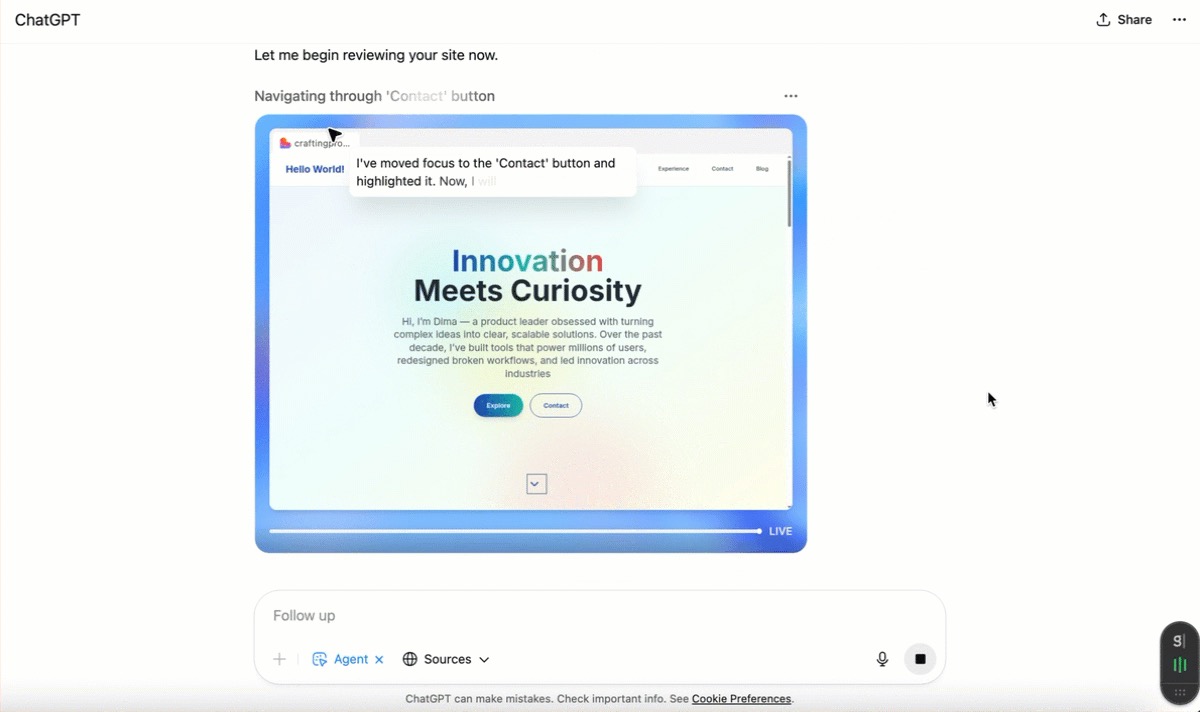
The solution: I used an OpenAI agent to perform a comprehensive accessibility audit. It didn't just run automated checks—it simulated real user interactions, navigated with keyboard-only, analysed semantic structure, and generated a detailed WCAG 2.1 report.
What makes this OpenAI Agent truly remarkable:
The sophistication is mind-blowing. This isn't your typical automated scanner that flags obvious issues. The agent actually understands user experience—it navigates like a real person with disabilities would, identifies subtle UX problems that affect real users, and provides contextual recommendations that make sense.
It analysed my site's visual hierarchy, tested every interactive element's keyboard accessibility, evaluated semantic meaning behind design choices, and even caught issues with state communication that manual testing often misses. The agent generated a 5-page report with specific code recommendations, WCAG guideline references, and prioritised action items.
Most impressive? It understood the intent behind my design choices and suggested improvements that maintained the aesthetic while fixing accessibility barriers.
What the AI caught that I missed:
Skip links existed but weren't visible to users
Form labels weren't properly associated with inputs
Gradient backgrounds created contrast issues
Icons lacked descriptive text for screen readers
Expandable sections didn't communicate state changes
The takeaway: Lovable gets you 80% there incredibly fast. AI-powered auditing gets you the remaining 20% without the manual complexity. It's not a silver bullet, but it transforms accessibility from a daunting checklist into actionable, specific improvements.
Building inclusive products shouldn't slow you down—it should just be smarter.
Under the Hood: The Complete Technical Breakdown
For those who want to understand exactly what happened, how the AI worked, and what the detailed findings mean for the future of web accessibility.
The Audit Process: How the OpenAI Agent Actually Works
The OpenAI agent didn't just scan my site—it performed a methodical, human-like evaluation that would make accessibility consultants proud. Here's what happened behind the scenes:
Phase 1: Environmental Setup The agent first understood the context: a React-based site built with Lovable, using Tailwind CSS, targeting WCAG 2.1 Level AA compliance. It identified the key user journeys: navigation → hero section → experience cards → contact form.
Phase 2: Systematic Navigation Testing Using keyboard-only navigation, the agent traced every possible path through the site. It tested Tab order, verified focus indicators, checked for keyboard traps, and ensured all interactive elements were reachable. Remarkably, it documented the exact focus sequence: "navigation links → hero buttons → arrow to next section → experience cards → contact form."
Phase 3: Semantic Structure Analysis The agent evaluated the HTML structure for semantic meaning, checking heading hierarchy, landmark usage, and ARIA implementation. It specifically looked for proper use of <header>, <nav>, <main>, and <footer> elements.
Phase 4: Assistive Technology Simulation This is where it gets fascinating. The agent simulated how screen readers would interpret the content, identifying where information would be unclear, missing, or confusing to users relying on assistive technology.
The Detailed Findings: What 8 Critical Issues Actually Mean
1. The Alternative Text Problem The agent found that my React components weren't properly handling alt text for images and icons. While Lovable generated clean code, the bundled JavaScript made it difficult to verify whether images had appropriate descriptions. The agent specifically noted: "icons were not announced when tabbed" and "screen inspection did not reveal text descriptions."
Technical implication: Even if alt text exists in the code, if it's not properly connected to the DOM when components render, screen readers can't access it.
2. Color Contrast: The Gradient Trap My hero section used a beautiful pastel gradient behind the heading "Innovation Meets Curiosity." The agent calculated that this likely failed the 4.5:1 contrast ratio required for normal text. It also caught that I was using color alone to indicate states—a classic accessibility mistake.
Design insight: Modern web design trends (gradients, subtle colors, minimalism) often conflict with accessibility requirements. The agent suggested specific solutions: "Darken the gradient behind the main heading or use a darker text colour."
3. Hidden Skip Links: Present but Invisible This was a clever catch. The agent detected that skip links existed in the code (#main-content, #navigation) but weren't visible to users. They showed up in the browser's status bar when tabbed, but users couldn't see them.
UX impact: Keyboard users rely on skip links to bypass repetitive navigation. Hidden skip links are like having a wheelchair ramp that exists but is invisible.
4. Form Accessibility: The Label Association Gap The contact form displayed visual labels ("Name ", "Email ", "Message *"), but the agent couldn't verify programmatic association between labels and inputs. This is critical because screen readers need explicit connections to announce field purposes.
Technical detail: The agent recommended ensuring each <input> has a <label for="..."> pointing to the field's ID, or uses aria-label. It also suggested adding aria-required="true" for required fields.
5. State Management in Interactive Elements The "Show More/Show Less" buttons on experience cards were visually clear but semantically empty. The agent noted: "the state change is visual but there is no textual indication or ARIA attribute to reflect the expanded state."
Accessibility principle: Every visual state change must have a programmatic equivalent that assistive technology can detect and announce.
6. Link Context: The External Icon Problem Small external-link icons in experience cards and contact sections lacked descriptive text. The agent predicted that screen-reader users would hear "link link" or meaningless descriptions instead of understanding the link's purpose.
Solution specificity: Rather than generic advice, the agent provided exact recommendations: "Visit Foundever site" or "Connect on LinkedIn" as appropriate aria-labels.
7. Document Language Declaration A subtle but important finding: the HTML source didn't specify the document language. The agent noted this affects screen reader pronunciation and language detection.
Technical requirement: WCAG requires <html lang="en"> (or appropriate language) so assistive technology can select correct pronunciation rules.
8. Semantic HTML vs. Generic Divs The agent identified over-reliance on generic <div> elements typical in React/Tailwind setups. While functional, this approach requires additional ARIA attributes to communicate structure that semantic HTML provides automatically.
Framework insight: Modern JavaScript frameworks make it easy to create accessible-looking interfaces that lack semantic meaning. The agent recommended prioritizing native HTML elements over ARIA workarounds.
What This Means for the Future of Web Development
The Speed Factor A professional accessibility audit typically takes 2-4 hours for a site this size and costs $500-2000. The OpenAI agent completed comparable analysis in under 10 minutes at a fraction of the cost.
The Quality Surprise I expected AI-generated findings to be generic and surface-level. Instead, the agent provided contextual, specific recommendations that demonstrated genuine understanding of user experience principles.
The Lovable Integration Opportunity This experiment highlighted a clear path forward for no-code platforms. Lovable excels at rapid development, but integrating AI-powered accessibility checking could make it the first no-code tool that truly builds accessible sites by default.
The Broader Implications If AI can perform accessibility audits this effectively, it changes the entire equation. Accessibility stops being a specialized, expensive afterthought and becomes an integral, affordable part of the development process.
Lessons Learned: Beyond the Technical Fixes
1. No-Code Doesn't Mean No-Responsibility Lovable gave me incredible development speed, but I incorrectly assumed accessibility would be handled automatically. The reality: every tool has gaps, and accessibility requires intentional attention regardless of platform.
2. AI as an Accessibility Democratizer Professional accessibility expertise is expensive and scarce. AI doesn't replace human experts, but it makes accessibility knowledge accessible to individual developers and small teams who couldn't otherwise afford professional audits.
3. The 80/20 Rule in Action Lovable handled 80% of accessibility automatically (keyboard navigation, focus indicators, responsive design). AI helped identify and fix the critical 20% that makes the difference between accessible and truly inclusive.
4. Design Decisions Have Accessibility Consequences Every aesthetic choice—gradients, icons, colors, animations—carries accessibility implications. The agent helped me understand these connections in ways that manual testing wouldn't have revealed.
Next Steps: Implementing the Recommendations
Based on the audit, I'm implementing fixes in priority order:
High Priority (User Impact):
Add visible skip links
Fix color contrast ratios
Associate form labels properly
Add descriptive alt text for all images
Medium Priority (Standards Compliance):
Implement proper ARIA state management
Add document language declaration
Improve semantic HTML structure
Low Priority (Enhancement):
Validate with additional accessibility tools
Test with actual screen reader software
Consider user testing with people who use assistive technology
The Bigger Picture: What This Experiment Reveals
This wasn't just about fixing my website—it was about understanding how AI can transform accessibility from a barrier into an accelerator. The combination of Lovable's development speed and AI's analytical depth suggests a future where accessible design isn't more difficult or expensive—it's just better design, automatically verified and continuously improved.
The real breakthrough isn't that AI can find accessibility issues. It's that AI can understand user experience well enough to provide meaningful, actionable solutions that respect both design intent and user needs.
For anyone building digital products—whether with no-code tools, traditional development, or anything in between—this approach offers a practical path toward truly inclusive design. Not because it's required by law or good for business (though both are true), but because it's simply better product development.
Building for everyone doesn't slow you down. It just makes you think smarter.