Field Note · 17 August 2025
What I Actually Learned from OpenAI’s Prompts (and How to Prototype Better)
I went down a rabbit hole analyzing 50+ OpenAI prompt examples that actually shipped prototypes. What I found wasn’t a secret formula—it was a simple pattern. The best prompts looked less like “magic incantations” and more like one-page product briefs: Name, Goal, Features, Style, and Endform. In this post I’ll share real examples, highlight what worked, and show how small tweaks can turn vague asks into shippable prototypes in tools like Lovable, v0, or Replit.
- Filed
- 17 August 2025
- Author
- Dmitrii Abramov
- Reading time
- 7 min
- Share
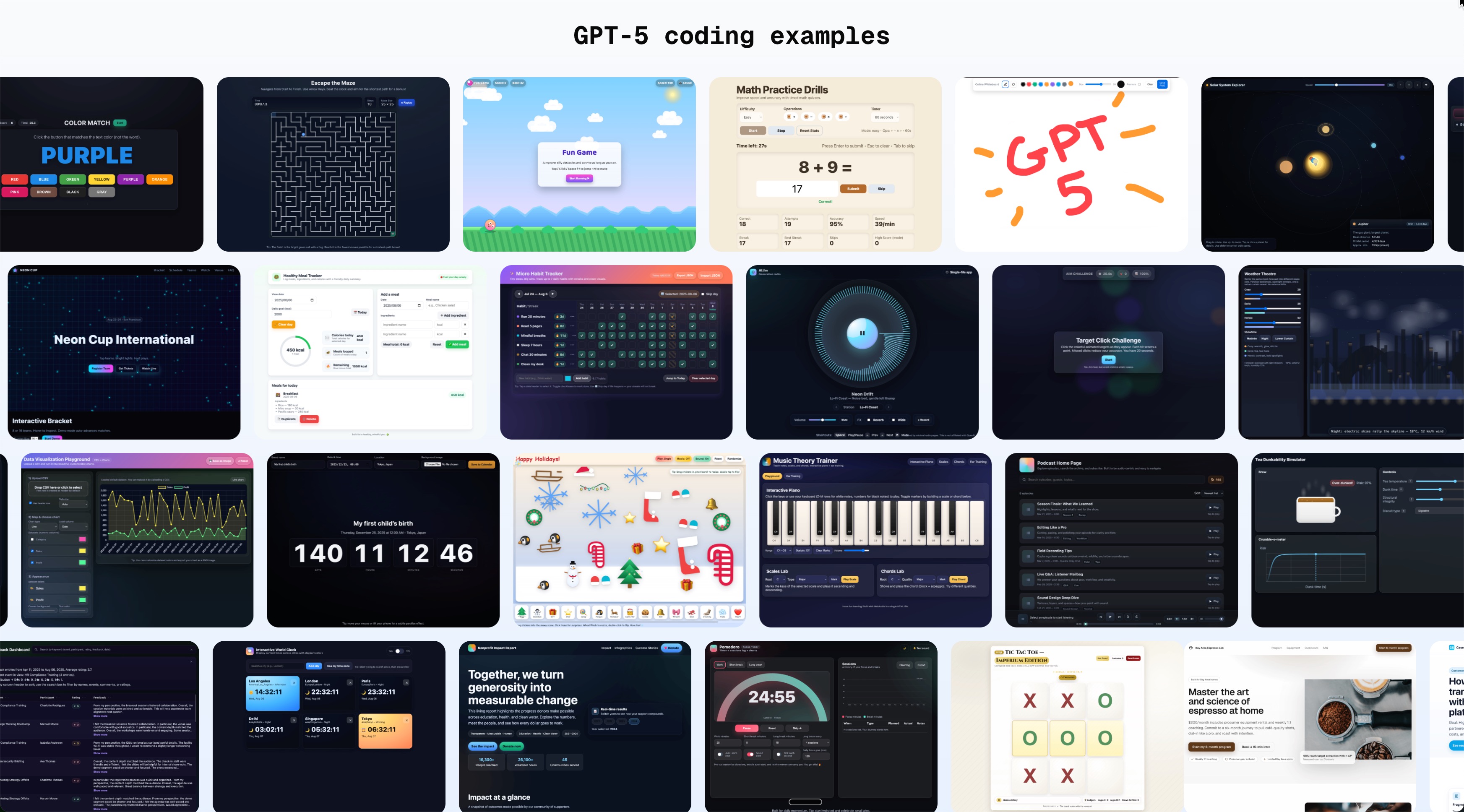
This isn’t a grand new framework. It’s a field note from reading a lot of prompts that shipped real prototypes—and noticing the same simple patterns over and over.
What I looked at (and what this is not)
I read through dozens of OpenAI GPT-5 coding examples (apps, games, dashboards, utilities).
I also cross-checked a few popular prompting guides (PROMPT, CLEAR) and tested outputs in Lovable and v0 to see what consistently helped.
This is not a scientific study. It’s pattern spotting + pragmatic takeaways for anyone prototyping with AI.
The patterns that kept showing up
Across the examples, four ingredients came up again and again:
Name + Goal — say what the thing is and why it exists.
Features as bullets — break requirements into short, checkable items.
Style/Vibe — a line or two about the look/feel.
Endform — the exact output format (e.g., “single HTML file”).
Sometimes there are Constraints (no external APIs, accessibility, performance), but those four dominate.
Full prompts with highlights
Below are complete prompts (from the set you shared) with the relevant bits bolded so you can see the pattern in the wild.
1) Podcast Home Page (landing)
Create a single-page app in a single HTML file with the following requirements:
Name: Podcast Home Page
Goal: Display all podcast episodes.
Features: Episode list, search, subscribe buttons.
The UI should be audio-centric and easy to navigate.
Why it works: clear Name+Goal, tight feature list, a small vibe hint, and an Endform (“single HTML file”) that removes ambiguity. Link to a demo.
2) Brutalist Dev Platform (landing)
Title: Brutalist Dev Platform Landing
Prompt:
Build a single HTML file for a brutalist developer platform landing page.
Style: monochrome, oversized type, strict 12-col grid, visible outlines, sharp corners; cursor shows grid coordinates.
Hero: stark headline, one-line value prop, two CTAs (“Start free”, “Docs”), background = live terminal demo typing a sample API call.
Proof: SVG logo wall + light/dark invert toggle.
Features: 3 code-snippet cards with tabs (JS/Python/cURL), copy-to-clipboard + tooltip.
Pricing: 3-tier table with sticky header, CTAs open signup modal.
Footer: keyboard-navigable site map + social links; only SVGs; responsive & fast.
Highlights: Endform (single HTML file), rich Style, explicit Features. Name/Goal is implied by the title and sectioning.
3) Audio Step Sequencer (app)
Create a single-page app in a single HTML file with following requirements:
Name: Audio Step Sequencer
Stack: WebAudio API.
Goal: 16-step drum grid.
Features: Tempo, swing, patterns save/load, export WAV (render simple buffer).
The UI should be futuristic and make the play fun!
Highlights: Name+Goal, Features, Style, Endform. (It even calls out a tech stack.)
4) Regex Lab (tool)
Build a single-file regex playground (index.html) with no bundler that helps users learn and test regular expressions:
Inputs: pattern, flags (g i m s u y), and test text area with live updates
Output panes: highlighted matches with group colors, table of matches with indices and capture groups, and an explanation of the pattern using common tokens
Utilities: quick inserts for common tokens (\d, \w, \s, [A-Z], lookahead, etc.), copy/share permalink with pattern+flags encoded in URL hash
Error handling: graceful feedback for invalid patterns, show error message and caret position
UX: terminal-window style, light/dark toggle (default to dark), clear button
Highlights: Endform (“single-file index.html”), very explicit Features, a short Style cue (terminal-window), and practical Constraints (no bundler).
5) Tic Tac Toe (game)
Create a single-page app, in a single HTML file:
a Tic Tac Toe game that is Roman Empire themed, fully responsive, and modern.Requirements:
Full-viewport, fluid board (vmin-based) and mobile/desktop responsive layout.
Roman theme: marble background, gold accents, SPQR crest, subtle Colosseum vibe.
Customize dialog with theme/glyphs/mode/first move/AI discipline.
Game logic: minimax AI with difficulty handicaps; scoreboard; win highlight; canvas confetti; respects prefers-reduced-motion.
Accessibility: ARIA roles, live status updates, keyboard + touch.
Visuals: smooth hover/press, soft shadows, scalable type.
Constraints: no external JS frameworks; one HTML file (Google Fonts allowed).
Highlights: very strong Features, detailed Style, explicit Constraints, and Endform.
6) Kinetic Typography Studio (app)
Title: Kinetic Typography Studio
Prompt:
Create a single-page app, in a single HTML file, that lets users design and export animated text sequences.
Timeline editor with keyframes (position, scale, rotation, opacity…), easing, Bézier.
Animation presets: typewriter, bounce, liquid, glitch, fade-up, cascade…
Audio-reactive mode, live preview with scrub.
Style controls: fonts, weight, gradients, shadows, motion blur toggle…
Layout tools: safe-area guides, aspect presets, margins, grid.
Export: MP4/WebM/GIF or PNG sequence; frame rate & resolution options.
Accessibility: keyboard shortcuts, focus order, ARIA labels; respects “prefers-reduced-motion”.
Responsive, touch + mouse support; no external APIs.
Highlights: explicit Endform (single HTML), exhaustive Features, clear Constraints.
7) CSV → Charts (tool)
Create a single-page app in a single HTML file with the following requirements:
Name: Data Visualization Playground
Goal: Upload CSV and generate charts.
Features: Chart type selector, color customization, save as image.
The UI should be modern with a focus on charts.
Highlights: Name+Goal, Features, Style, Endform. (It reads like a mini spec.)
8) Espresso Subscription (landing)
Please generate a beautiful, realistic landing page for a service that provides the ultimate coffee enthusiast a $200/month subscription that provides equipment rental and coaching for coffee roasting and creating the ultimate espresso. The target audience is a bay area middle-aged person who might work in tech and is educated, has disposable income, and is passionate about the art and science of coffee. Optimize for conversion for a 6 month signup.
What’s strong: clear Goal and Audience. Strong vibe (“beautiful, realistic”, conversion focus).
What’s missing (common failure mode): no Endform (“single HTML file?” “Next.js?”), no Features (hero, plan cards, FAQ, testimonials, checkout?), no Constraints.
9) Event Feedback Dashboard (app)
Create a single-page app in a single HTML file that provides the following features using modern, user-friendly web frontend components suitable for business users:
Display a large table view listing all database rows (date, event, participant, rating, feedback).
Feedback should be long, but the table should display it nicely.
Search bar to filter entries by keyword.
AI summary section at the top with a close button.
Populate with a realistic, randomly generated dataset (30 entries).
Sortable columns with icons for sort direction.
Pay attention to details: layout intact, sensible palette, nothing broken.
Highlights: crisp Features, “business UI” vibe, and an Endform.
10) Tiny Kanban (app)
Create a single-page app in a single HTML file with the following requirements:
Name: Tiny Kanban
Goal: Todo → Doing → Done workflow.
Features: Drag cards, WIP limits, priority colors, assign to people, search filter, delete items.
The UI, font size, and colors should suit daily standup meetings.
Highlights: Name+Goal, Features, Style, Endform.
What this means for prototyping (Lovable, v0, Replit)
When I moved from vague asks to the pattern above, outputs were immediately more complete and shippable. Not because of secret tricks—because the prompt looked like a one-page product brief.
If you do just three things, do these:
Start with Name + Goal
List 4–8 Features as bullets
Pin the Endform (e.g., “single HTML file”)
Everything else (style, constraints) is optional seasoning.
A one-minute prompt audit
Before you hit enter, ask:
Does it name what I’m building and why?
Will a stranger know what features must exist?
Did I give 1–2 style words so it doesn’t look generic?
Did I say exactly what to return (Endform)?
If this fails, what constraint did I forget?
References & further reading
OpenAI GPT-5 coding examples (prompt set this analysis is based on): https://github.com/openai/gpt-5-coding-examples/tree/main
CLEAR framework (ACU guide): https://libguides.acu.edu.au/ai-prompts/clear
9 Prompting Frameworks overview (Felix Pappe): https://felix-pappe.medium.com/9-best-prompting-frameworks-to-supercharge-your-everyday-research-with-llms-9b5383a3eb7a
Tools I tested with: Lovable, v0 (v0.dev), Replit (replit.com), Bolt (bolt.new)
Prompt Engineering in 2025: The Latest Best Practices
Ultimate Guide to AI Prototyping Tools (Lovable, Bolt, Replit, v0)